AR Plan 3D Tape Measure, Ruler
- 4.3
- Rating
- 10.00M
- Installs
- Free
- Price

 Analysis by App-foxy
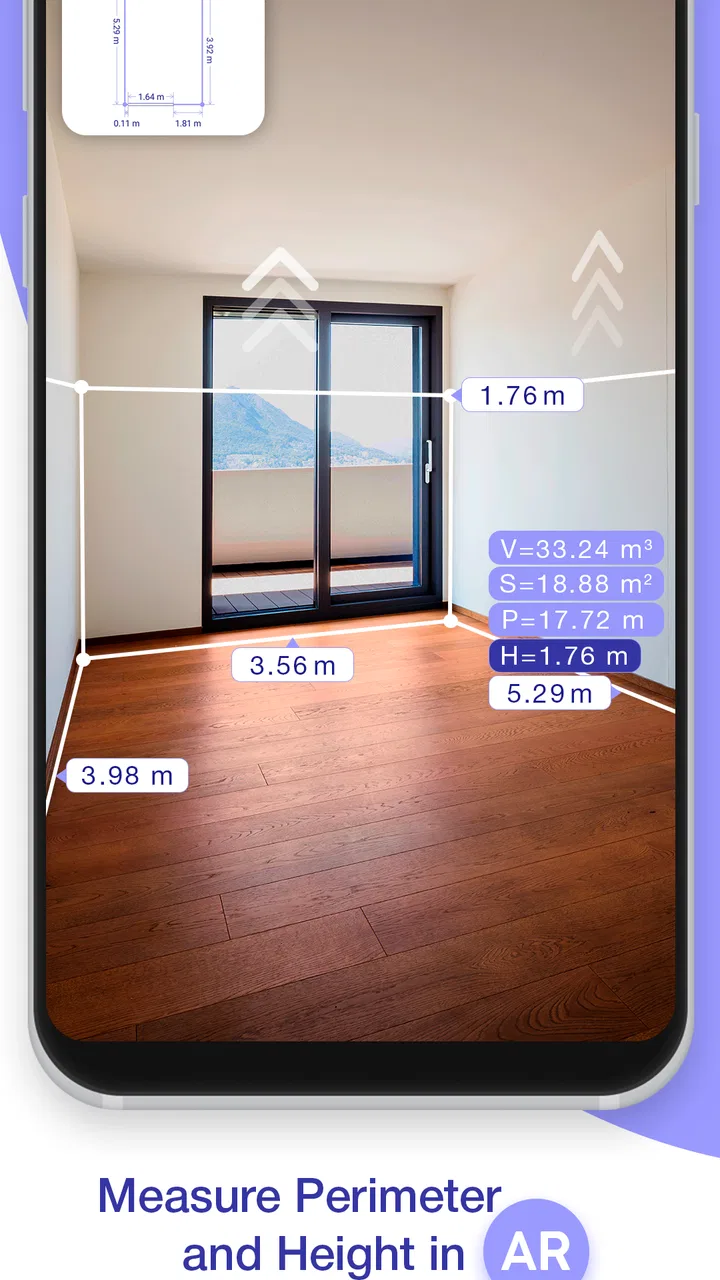
I tested AR Plan 3D Tape Measure, Ruler as a practical room-measuring tool rather than treating it like a replacement for every physical measuring device. Its purpose is straightforward: use the phone’s camera and augmented-reality view to estimate spaces, sketch layouts, and turn a quick look around a room into something more useful than a guess. That makes it appealing when I need an early plan for furniture, decorating, or a home project and do not want to carry a tape measure everywhere.
The app comes from Grymala apps and sits in the Tools category. It is free to install, rated for Everyone, and has reached over ten million installs, with an average score of 4.3 from around two hundred seventeen thousand ratings. Those figures suggest that it has found a broad audience, but they do not remove the need to use it carefully. Augmented-reality measuring depends heavily on the phone, the room, the lighting, and the way I move the device.
How the measuring experience feels in everyday use
The first thing I noticed is that the app’s usefulness depends less on fast tapping and more on a calm setup. I have to give the camera enough time to understand the scene, keep the phone reasonably steady, and choose clear points on floors, walls, or objects. When I rush, the result can feel less convincing even if the app itself responds quickly. When I slow down and scan deliberately, the workflow becomes much easier to trust for planning.
You May Also Like

 Blood Strike: 2.5 Anniversary
Blood Strike’s Loadouts Turn Every Drop Into a Tactical Gamble
A close look at Blood Strike’s custom loadouts: how fast access to signature weapons reshapes its battle royale rhythm, rewards preparation, and narrows the gap between fights.

 Pandora - Music & Podcasts
Pandora’s Music Is Easy to Start, but Harder to Recover
Pandora’s strength is its low-effort path from a seed to a station. Its weak spot is how much confidence it asks you to place in connection, setup, and quiet recovery.

 8 Ball Pool
 Is Built on Rivalries, Rematches, and Routine
A close look at the rivalries, rematches, shared routines, and unanswered safety questions that turn a quick pool match into a persistent mobile community.

 Samsung Music
’s Quiet Strength Is Playing What You Already Own
Its reach comes less from spectacle than from dependable access to a personal library. That simplicity is both the app’s strongest retention engine and its ceiling.

 AccuWeather: Weather Radar
AccuWeather Review: A Quick, Clear Forecast for Everyday Decisions
For everyday plans, the best forecast is the one you can understand quickly. AccuWeather makes rain timing, radar, and local conditions easy to act on, with a few trade-offs.

 Hill Climb Racing
Why Hill Climb Racing Still Turns Crashes Into One More Run
A tiny car, a bumpy hill and one more upgrade: Hill Climb Racing keeps resurfacing because its simple chaos makes every near-miss feel personal.
More From Our News Desk
View All News


This is where the app’s perceived speed needs a little context. It can be quick for a single estimate, such as checking whether a narrow cabinet might fit beside a doorway. It is not the same as instantly reading a number from a tape measure. The camera needs a usable view, and I may need to repeat a point if the surface is visually confusing. In practice, that extra setup is the price of getting a digital floor plan or a three-dimensional impression instead of one isolated measurement.
I would use it first for questions that are approximate by nature. Before visiting a furniture shop, I can map the rough dimensions of a room and note where doors, windows, or large pieces already sit. During a move, I can create a quick reference for deciding which items deserve another look. For decorating, a visual layout is more helpful than a list of numbers because it lets me think about the relationship between objects and available space.
The app is also more useful when I treat each scan as part of a workflow. I prefer to clear loose objects from the area, improve the light where possible, and measure the same space from more than one direction. That is not busywork. It gives me a way to notice an obviously inconsistent result before I act on it. A single number that looks plausible can still be wrong if the camera has misunderstood the surface.
Where it saves time, and where it does not
Compared with a conventional tape measure, this app reduces the need to write down every figure manually and can make a room easier to visualize. Compared with drawing a plan from scratch, it offers a more immediate starting point. The trade-off is that the phone becomes part of the measuring instrument. I need one hand available for the device, I need a clear view, and I have to pay attention to how the augmented markers sit on the real scene.
That makes it especially convenient for a first visit to a property or a quick check in a room where I do not have tools nearby. It is less convenient when I need a certified, repeatable measurement for construction, custom fabrication, or a purchase with almost no margin for error. In those cases, I would use a physical tape or a professional laser measure to verify the important dimensions, even if I used this app to prepare a rough plan first.
A useful habit is to separate “planning measurements” from “final measurements.” I can use AR Plan 3D to decide whether a sofa arrangement is worth considering, then confirm the tight clearances with a physical tool. This two-step approach makes sense because the app’s greatest strength is speed of visualization, not replacing every form of precision measurement.
What happens when the project becomes larger
A small room with clear walls is a relatively comfortable test. A larger or busier space is more demanding. Furniture, reflective surfaces, repeating patterns, poor lighting, and narrow passages can all make it harder for a camera-based system to maintain a dependable understanding of the environment. I would expect more pauses, corrections, or rescans in those situations, not necessarily because the app has stopped working, but because the visual information is harder to interpret.
Heavy use also changes the experience. Measuring one wall is a light task; creating a complete house layout involves repeated scanning, moving between rooms, checking transitions, and reviewing the result. That naturally places more demand on the phone’s camera and processing resources than a short estimate. I would avoid beginning a long scanning session with a nearly empty battery or while many other demanding apps are running in the background.
For a multi-room project, I would work in stages. I would finish one room, review it, and make a note of any questionable corners before moving on. This is better than trying to capture everything in one uninterrupted pass. If something goes wrong, I can identify the affected area instead of losing confidence in the entire layout. It also keeps the project manageable on a smaller phone screen.
The app’s 3D focus is valuable here because a floor plan alone can hide practical problems. A drawing may show that two objects fit on paper, while a three-dimensional view encourages me to think about height, movement, and the feeling of the space. I would still inspect the real room, but the visual model can expose awkward arrangements earlier than a simple written list.
Stability, corrections, and recovering from a poor scan
Reliability in an AR measuring app is not only about whether it opens and responds. It is also about whether I can recognize a doubtful result and recover without starting the entire project again. My preferred approach is to watch the markers while moving slowly and to avoid accepting a measurement merely because a line has appeared. If the line seems to float, jump, or attach to the wrong plane, I treat it as a warning rather than a finished answer.
When a scan becomes unreliable, I would first stop moving and give the camera a clearer view. Then I would reposition myself, improve the angle, and repeat the questionable section. Measuring from a different direction is a particularly useful check: if the same wall produces noticeably different results, I know the number needs verification. This is one of the most important practical lessons with AR tools, because recovery is often faster than trying to force a bad scan to continue.
Busy rooms deserve extra skepticism. A patterned rug can make the floor harder to interpret, while a dark corner may provide less useful visual information. Glass and highly reflective surfaces can also complicate any camera-based estimate. I would not regard a smooth-looking result as proof that every point was captured correctly. The app can help me build a plan, but I remain responsible for checking whether the plan matches the physical room.
For important work, I would keep a second record of critical dimensions. That could be a note made with a physical tape measure or a simple written confirmation of the longest walls and narrowest passages. The point is not to distrust the app completely; it is to avoid allowing one uncertain reading to decide an expensive purchase or irreversible project.
Phone limits and resource expectations
The minimum operating-system requirement is Android 8.0, and the current version is 5.0.5. Those details make the app accessible to many Android users, but the operating system alone does not guarantee an equally smooth experience on every device. Camera quality, motion sensors, processing power, display size, and battery condition all influence how comfortable an AR session feels.
On a newer phone, I would expect the camera view and 3D interaction to feel more comfortable, particularly when moving around a larger room. On an older or less capable device, the limiting factor may be heat, battery drain, slower scene processing, or a less stable camera experience during a long session. I would test a small area first rather than committing immediately to a whole-home scan.
Screen size matters more than it may seem. A compact phone is easy to carry, but reviewing a detailed layout or checking a tight corner can be less comfortable. A larger display gives me more room to inspect the plan, although it can also be heavier to hold steadily. That is a real trade-off for an app that asks me to look through the phone while physically walking around.
I also would not plan a long measuring session while the phone is already warm from navigation, video, or gaming. Camera-heavy use can be more demanding than ordinary note-taking, and a sensible workflow is to close unnecessary tasks, keep the device charged, and take breaks between rooms. These are practical precautions rather than promises about exact battery consumption, since the result varies greatly by phone and environment.
Free access, optional spending, and who should use it
The app is free, which makes it easy to try before deciding whether it belongs in a regular home-improvement toolkit. In-app purchases range from $0.99 to $119.99 per item, so I would check what an optional purchase unlocks and whether it matches my actual needs before spending money. For occasional room planning, the free starting point may be enough to judge the workflow. For frequent use, I would evaluate the value based on how often I create layouts and how much time the app saves me.
I think it is a strong fit for renters, homeowners, decorators, students working on space planning, movers, and anyone who wants a quick visual reference before buying furniture. It can also help a person communicate an idea to someone else: showing a rough arrangement is often clearer than describing distances over the phone.
I would skip it as the only tool for contractors, installers, surveyors, or anyone producing measurements that must meet a formal tolerance. I would also avoid relying on it for a very small clearance where a few millimeters decide whether something fits. A physical ruler, tape, or laser device is better for that final check. The app is most convincing when used as a fast planning layer, not as a professional certification instrument.
My verdict after weighing speed against confidence
AR Plan 3D Tape Measure, Ruler is at its best when I need an answer quickly and visually: Can this arrangement work? Is there enough room for that furniture? How might this space look as a basic floor plan? Its camera-based approach can save time, and the 3D perspective adds context that ordinary notes do not provide.
Its performance is less about raw speed than about preparation. Clear surfaces, steady movement, good lighting, and a willingness to repeat doubtful sections make the experience substantially better. Large, cluttered, or visually difficult spaces may demand more patience, while long sessions can be less comfortable on weaker phones. Those are meaningful limitations, but they are manageable when I plan around them.
The developer, Grymala apps, has made a free tool that is easy to justify trying, especially for everyday home decisions. Its Everyone age rating also makes it approachable for general household use. I would recommend it to a friend who wants a convenient first draft of a room or home layout, with one condition: use the app to explore and organize ideas, then verify critical measurements before spending money or starting work.
That distinction is what gives the app a fair performance verdict. It is faster and more visual than drawing a plan by hand, more convenient than carrying a tape measure for casual checks, and less dependable than a dedicated precision instrument for final dimensions. If that balance matches your needs, it is a useful addition to a phone. If absolute accuracy is the main requirement, the usual physical alternatives remain the better choice.
FAQs for AR Plan 3D Tape Measure, Ruler
01What is AR Plan 3D Tape Measure, Ruler used for?
AR Plan 3D Tape Measure, Ruler is designed to measure real-world spaces and objects through your phone’s camera and augmented reality technology. It can help estimate distances, heights, perimeters, room dimensions, and floor areas without requiring a traditional tape measure. It is especially useful for quick home measurements, furniture planning, interior projects, and creating a basic visual reference before purchasing materials or arranging a room.
02How accurate are the measurements in AR Plan 3D Tape Measure, Ruler?
The app can provide convenient estimates, but its accuracy depends heavily on your device, lighting, camera quality, surface visibility, and the way you move the phone. Before measuring, it is important to scan the area slowly and keep the camera steady. Results should not be treated as professional surveying data. For construction, legal, engineering, or highly precise work, you should confirm measurements with a physical tool or professional equipment.
03Does AR Plan 3D Tape Measure, Ruler work on every Android or iPhone?
The application may not offer the same experience on every smartphone because augmented reality features require compatible camera hardware, motion sensors, and operating-system support. Some devices may support only basic measuring functions, while others can provide more advanced room or 3D features. Before downloading, check the app-store compatibility information and make sure your phone has updated software, sufficient storage, and permission to use the camera.
04Does AR Plan 3D Tape Measure, Ruler require an internet connection?
Many camera-based measuring functions may work without a continuous internet connection once the application is installed, which is useful when measuring in a new home or an area with weak signal. However, internet access may still be needed for downloading the app, displaying advertisements, restoring purchases, synchronizing data, or accessing certain optional features. Availability can vary by platform and app version, so offline support should not be assumed for every tool.
05Is AR Plan 3D Tape Measure, Ruler free to use, and are there advertisements or in-app purchases?
The app may be available to download at no initial cost, but free access can include advertisements, feature restrictions, or optional in-app purchases. Premium tools may unlock additional measurement modes, remove advertising, or provide export and planning capabilities. Pricing and included features can change between Android and iOS versions, so review the current store listing carefully before subscribing or making a purchase, particularly if a trial period is offered.
Pros
- Measures rooms and objects quickly using augmented reality.
- Supports floor plans and 3D layouts for better space planning.
- Includes area
- perimeter
- height
- and distance measurement tools.
- Useful for estimating furniture placement and renovation requirements.
- Offers convenient digital records instead of relying on a physical tape measure.
Cons
- Accuracy can vary with lighting
- surfaces
- and phone camera quality.
- Some advanced tools or exports may require a paid subscription.
- AR setup may take time before measurements become stable and reliable.
- Large or complex spaces can be difficult to scan consistently.
- Continuous camera use may drain the battery during longer projects.

AR Plan 3D Tape Measure, Ruler
Gallery